Example Deployment: L3 Priority Paths for 8 Storage Servers
This page walks through a complete SiteRM deployment for a storage site with 8 data servers (DTNs) and one redirector, prepared so that SENSE can build Layer 3 priority paths (BGP over a dedicated VLAN) for Rucio/FTS transfers. It covers the work a site does once, by hand: IPv6 allocation, router configuration, host networking, DNS, certificates, the storage redirector and the SiteRM configuration. It then shows what SiteRM changes on the network for each request.
There are two ways to provide the address space:
- Model A (recommended): one /60 routed to the SENSE router and split into 16 /64s. Most of this page uses Model A.
- Model B: individual /64s, each configured by hand on the network devices. See Model B for what changes.
All addresses, names and AS numbers on this page are documentation values:
2001:db8::/32(RFC 3849),example.org,192.0.2.0/24and AS 64496 (RFC 5398). Replace them with your own. Contact the SENSE team (sense-info@es.net) before you start: they assign the private ASN and the VLAN range, and provide the ESnet port details.
How SENSE steers traffic
SENSE steers traffic by subnet. Each priority path carries exactly one /64 at each site. For a request, SiteRM creates a VLAN from the SENSE router through ESnet to the remote site, opens a BGP session over it and announces only that /64. Traffic between the two /64s follows the priority path. All other traffic stays on the normal routed path.
A storage cluster therefore has to be reachable on several /64s at once: every data server and the redirector has one address in every /64. The Data Movement Manager (DMM) gives Rucio a different set of endpoints for each path, for example redir-f013.t2.example.org for the path that uses the f013 subnet.
The example site
| Item | Value |
|---|---|
| Site name | T2_US_Example |
| DNS domain | t2.example.org |
| Data servers |
dtn-01 … dtn-08, one 100 Gb/s NIC each (enp1s0f0np0), MTU 9000 |
| Redirector |
redir: XRootD redirector for the default subnet, HAProxy for the SENSE subnets |
| SiteRM Frontend |
sense-fe.t2.example.org (VM, container or Kubernetes) |
| SENSE router | Cisco Nexus 9000, named cisconx_s0 in SiteRM, dedicated to SENSE, private AS 65010 |
| Border router | The site’s production router, AS 64496, announces 2001:db8:6020::/48
|
| WAN port |
Ethernet1/36 to ESnet, 400 Gb/s, VLANs 3600-3619 |
| Host ports |
Ethernet1/1 … Ethernet1/8 (DTNs), Ethernet1/9 (redirector), host VLAN 1010 untagged |
| Border link |
Ethernet1/48, point-to-point 2001:db8:6020:ff00::/126
|
The priority paths in this example are IPv6 only. Hosts keep their existing IPv4 management addresses; SiteRM Agents use them to identify themselves.
The router commands on this page are for Cisco NX-OS. The base configuration is the same idea on every platform; see Network Devices for the commands SiteRM runs on other NOS.
Choose an addressing model
| Model A: one /60 | Model B: individual /64s | |
|---|---|---|
| What you request | One /60 on a /60 boundary | One default /64 plus at least three SENSE /64s |
| Concurrent priority paths | 15 | One per SENSE /64 (3 in the example) |
| Border router | One static route | One static route per /64 |
| SENSE router gateway | One VLAN interface with 16 addresses | One VLAN interface, one address per /64 |
| DNS names (9 hosts) | 144 | 36 |
| LHCONE / CRIC registration | One prefix | Every /64 |
| Adding a path later | Already in place | New /64, then repeat steps 1-7 for it |
Model A at a glance
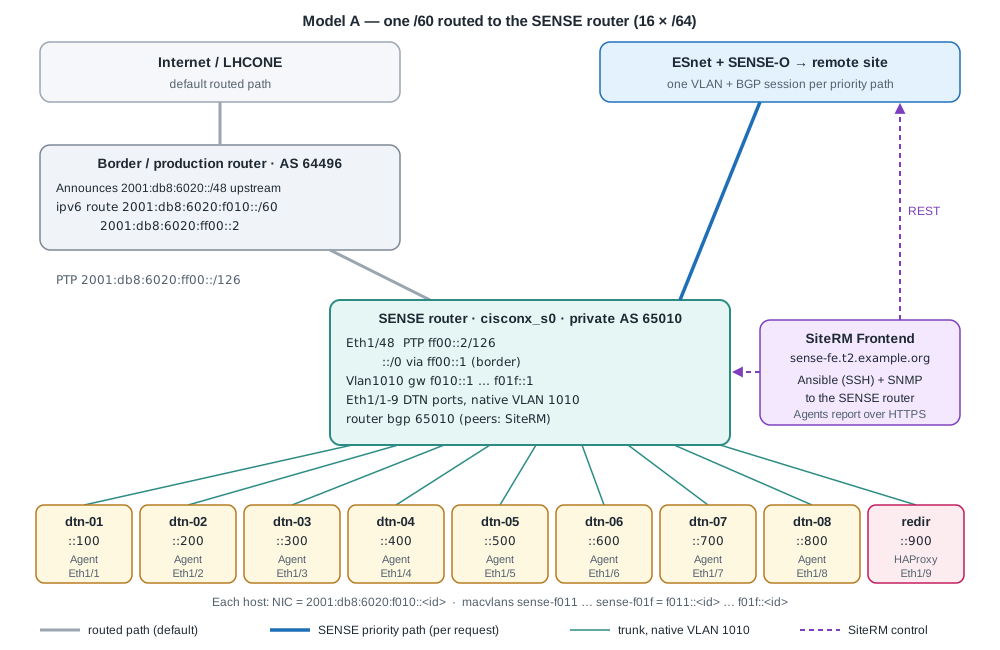
Every host uses the same host id in every subnet: dtn-01 is ::100 everywhere, dtn-08 is ::800 and the redirector is ::900. The XRootD redirector plugin requires this, and it keeps DNS readable.
| Subnet | Role | Gateway (SENSE router) | dtn-01 … dtn-08 | Redirector | DNS names |
|---|---|---|---|---|---|
2001:db8:6020:f010::/64 |
Default: normal transfers, SAM tests | f010::1 |
f010::100 … f010::800
|
f010::900 |
dtn-01, redir
|
2001:db8:6020:f011::/64 |
SENSE path 1 | f011::1 |
f011::100 … f011::800
|
f011::900 |
dtn-f011-01, redir-f011
|
2001:db8:6020:f012::/64 |
SENSE path 2 | f012::1 |
f012::100 … f012::800
|
f012::900 |
dtn-f012-01, redir-f012
|
| … | … | … | … | … | … |
2001:db8:6020:f01f::/64 |
SENSE path 15 | f01f::1 |
f01f::100 … f01f::800
|
f01f::900 |
dtn-f01f-01, redir-f01f
|
2001:db8:6020:ff00::/126 |
Border link | border ::1, SENSE router ::2
|
The BGP peering addresses on the request VLANs (fc00::...) come from SiteRM’s ipv6-address-pool, not from your space. See Frontend Configuration if the default pool overlaps with anything at your site.
Step 1: Allocate the IPv6 space
- Request one /60 that starts on a /60 boundary. The last hex digit of the fourth group must be 0:
2001:db8:6020:f010::/60coversf010tof01f. -
List the 16 /64s:
python3 -c 'import ipaddress; print(*ipaddress.ip_network("2001:db8:6020:f010::/60").subnets(new_prefix=64), sep="\n")' - Use the first /64 (
f010) as the default subnet. The other 15 go into the SENSE pool. - Pick a /126 (or /127) for the border link, outside the /60.
- Make sure the /60 is covered by the prefix your border router announces to ESnet and, for LHCONE sites, to LHCONE.
- Register the /60 in CRIC with your site’s network information. Some sites use CRIC to decide whether traffic goes over LHCONE. If the SENSE subnets are missing there, transfers on these subnets can take the wrong path when no priority path is active.
- From the SENSE team, get the private ASN (64512-65534), the VLAN range on the WAN port (usually 3600-3619) and the ESnet port name for
isAlias.
Step 2: Configure the network devices (once, by hand)
SiteRM only adds and removes per-request configuration: VLANs on the WAN port, the VLAN interface with the peering address, prefix-lists, route-maps, BGP neighbors and network statements. Everything in this step is base configuration that you apply and own.
Border router
interface Ethernet1/10
  description PTP to SENSE router
  no switchport
  mtu 9216
  ipv6 address 2001:db8:6020:ff00::1/126
  ipv6 nd suppress-ra
  no shutdown

ipv6 route 2001:db8:6020:f010::/60 2001:db8:6020:ff00::2
With this route the whole /60 is reachable over the normal routed path at all times. A priority path only adds more specific routes on the SENSE router. When the path is removed, traffic falls back to this route.
If LHCONE is in a separate VRF on your border router, add the same /60 route in that VRF and announce the /60 to LHCONE. Traffic leaving the /60 must also be able to reach the LHCONE VRF, for example over a second point-to-point link in that VRF. This part depends on your routing policy.
SENSE router
feature bgp
feature interface-vlan
feature lldp

! Link to the border router. Default route for everything SENSE does not steer.
interface Ethernet1/48
  description PTP to border router
  no switchport
  mtu 9216
  ipv6 address 2001:db8:6020:ff00::2/126
  ipv6 nd suppress-ra
  no shutdown
ipv6 route ::/0 2001:db8:6020:ff00::1

! Host VLAN. Gateway for the default /64 and all 15 SENSE /64s.
vlan 1010
  name sense-hosts
interface Vlan1010
  description gateway 2001:db8:6020:f010::/60
  mtu 9216
  ipv6 address 2001:db8:6020:f010::1/64
  ipv6 address 2001:db8:6020:f011::1/64 secondary
  ipv6 address 2001:db8:6020:f012::1/64 secondary
  ! ... one line per /64 ...
  ipv6 address 2001:db8:6020:f01f::1/64 secondary
  ipv6 nd suppress-ra
  no shutdown

! DTN and redirector ports. Untagged host traffic lands in VLAN 1010.
interface Ethernet1/1-9
  switchport
  switchport mode trunk
  switchport trunk native vlan 1010
  switchport trunk allowed vlan 1010
  mtu 9216
  no shutdown

! WAN port to ESnet. SiteRM adds and removes VLANs 3600-3619 here.
interface Ethernet1/36
  description SENSE WAN to ESnet
  switchport
  switchport mode trunk
  switchport trunk allowed vlan none
  mtu 9216
  no shutdown

! BGP skeleton. SiteRM adds neighbors and network statements per request.
router bgp 65010
  router-id 192.0.2.10
  address-family ipv6 unicast
Notes:
- Some NX-OS releases accept a plain repeated
ipv6 addressline instead ofsecondary. After applying, runshow ipv6 interface Vlan1010and check that all 16 addresses are listed. - Every /64 in the SENSE pool must be in the SENSE router’s routing table (here: connected on
Vlan1010). A BGPnetworkstatement announces nothing for a prefix that is not in the routing table. - Router advertisements are suppressed. Hosts get static addresses and routes in Step 3.
- Cisco NX-OS and Arista EOS need the SENSE-controlled trunk ports to start with an empty allowed VLAN list (or only VLANs SENSE does not control). See Enable Switch Control.
Give SiteRM a login and SNMP read access from the Frontend:
username sense role network-admin
username sense sshkey ssh-ed25519 AAAA...replace... sense@sense-fe
snmp-server user sense-ro network-operator auth sha <auth-pass> priv aes-128 <priv-pass>
SiteRM needs to change VLANs, VLAN interfaces, trunk allowed lists, prefix-lists, route-maps and router bgp 65010. If your policy does not allow network-admin, create a role limited to these. The Cisco Nexus page lists every command SiteRM runs.
Devices in between
- If the SENSE router does not connect directly to the ESnet port, every device in between must carry VLANs 3600-3619 tagged end to end. SiteRM does not configure these devices.
- If the hosts connect through access switches, those switches must carry VLAN 1010 to the SENSE router.
- MTU 9216 on every hop.
Step 3: Configure the hosts
Every data server and the redirector gets:
- the default /64 address on the physical NIC, with the main default route via the SENSE router;
- one macvlan per SENSE /64, each with its own routing table and a source rule, so traffic from that /64 always leaves through its own gateway.
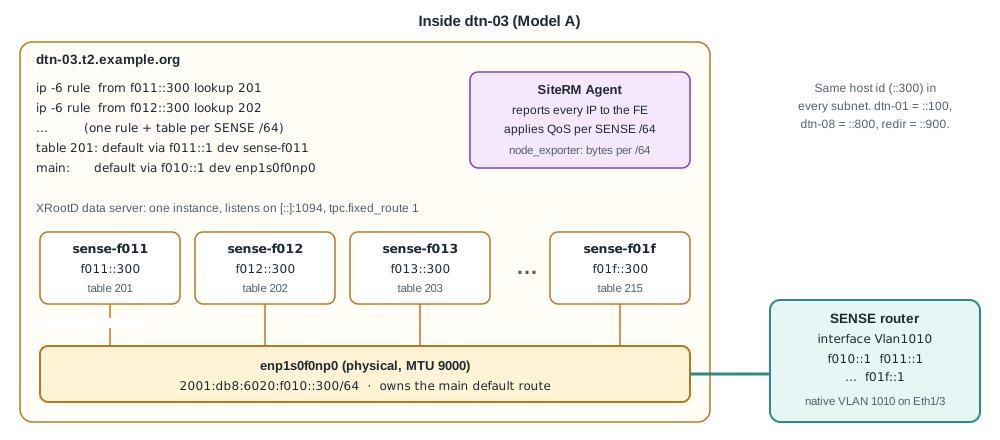
A separate interface per subnet also gives per-subnet byte counters in node_exporter (DMM uses these to measure each priority path) and a place to attach QoS per subnet.
Save this script as /usr/local/sbin/sense-multisubnet.sh on each host and change HOSTID (and PHYS if needed). It can be run again safely.
#!/bin/bash
# /usr/local/sbin/sense-multisubnet.sh
# SENSE multi-subnet IPv6 setup for one data server. Safe to run again.
set -euo pipefail

PHYS=enp1s0f0np0                   # data NIC, connected to the SENSE router
HOSTID=300                         # same in every subnet: dtn-01=100 ... dtn-08=800, redir=900
MTU=9000
DEFAULT_NET=2001:db8:6020:f010     # default /64 (first 64 bits); lives on PHYS
SENSE_NETS="2001:db8:6020:f011 2001:db8:6020:f012 2001:db8:6020:f013
            2001:db8:6020:f014 2001:db8:6020:f015 2001:db8:6020:f016
            2001:db8:6020:f017 2001:db8:6020:f018 2001:db8:6020:f019
            2001:db8:6020:f01a 2001:db8:6020:f01b 2001:db8:6020:f01c
            2001:db8:6020:f01d 2001:db8:6020:f01e 2001:db8:6020:f01f"
TABLE=200                          # first SENSE /64 uses table 201

# Default subnet: address on the physical NIC, main default route via the SENSE router.
sysctl -qw "net.ipv6.conf.${PHYS}.autoconf=0" "net.ipv6.conf.${PHYS}.accept_ra=0"
ip link set "${PHYS}" mtu "${MTU}" up
ip -6 addr replace "${DEFAULT_NET}::${HOSTID}/64" dev "${PHYS}"
ip -6 route replace default via "${DEFAULT_NET}::1" dev "${PHYS}"

for NET in ${SENSE_NETS}; do
    TABLE=$((TABLE + 1))
    # Name it after the subnet (sense-f011). Do not use vlan.<N>: SiteRM uses that for its VLANs.
    IF="sense-${NET##*:}"
    ip link show "${IF}" >/dev/null 2>&1 || ip link add "${IF}" link "${PHYS}" type macvlan mode bridge
    sysctl -qw "net.ipv6.conf.${IF}.autoconf=0" "net.ipv6.conf.${IF}.accept_ra=0"
    ip link set "${IF}" mtu "${MTU}" up
    ip -6 addr replace "${NET}::${HOSTID}/64" dev "${IF}"
    # Own table per subnet: traffic sourced from this /64 always leaves through its gateway.
    ip -6 route replace "${NET}::/64" dev "${IF}" table "${TABLE}"
    ip -6 route replace default via "${NET}::1" dev "${IF}" table "${TABLE}"
    while ip -6 rule del from "${NET}::${HOSTID}" table "${TABLE}" 2>/dev/null; do :; done
    ip -6 rule add from "${NET}::${HOSTID}" table "${TABLE}"
done
Run it at boot with /etc/systemd/system/sense-multisubnet.service:
[Unit]
Description=SENSE multi-subnet IPv6 addresses and routing
After=network-online.target
Wants=network-online.target

[Service]
Type=oneshot
RemainAfterExit=yes
ExecStart=/usr/local/sbin/sense-multisubnet.sh

[Install]
WantedBy=multi-user.target
chmod +x /usr/local/sbin/sense-multisubnet.sh
systemctl daemon-reload
systemctl enable --now sense-multisubnet.service
Check the result (dtn-03):
ip -br -6 addr show | grep -E 'enp1s0f0np0|sense-'   # 1 physical + 15 macvlans, all with ::300
ip -6 rule show | grep -c 'lookup 2'                  # 15
ip -6 route get 2001:db8:9000:a2::200 from 2001:db8:6020:f013::300
# 2001:db8:9000:a2::200 from 2001:db8:6020:f013::300 via 2001:db8:6020:f013::1 dev sense-f013 table 203 ...
ping -6 -c 3 -I 2001:db8:6020:f013::300 2001:db8:6020:f013::1
Notes:
- If NetworkManager or netplan manages the physical NIC, configure the default /64 address and route there and keep only the loop in the script.
- Never name a macvlan
vlan.<N>. The SiteRM Agent names its own VLAN interfaces that way and reads the VLAN id from the name. - Run node_exporter in the host network namespace so it sees the macvlan counters.
- On Kubernetes, the same layout is one pod per subnet with a Multus macvlan attachment instead of host macvlans.
Step 4: DNS
Naming convention (from the UCSD deployment):
| Host | Default subnet | SENSE subnet f011
|
|---|---|---|
| Data server 01 | dtn-01.t2.example.org |
dtn-f011-01.t2.example.org |
| Redirector | redir.t2.example.org |
redir-f011.t2.example.org |
Create both forward (AAAA) and reverse (PTR) records. dCache pools turn the selected IP address back into a name with a DNS lookup, and the redirects, TPC transfers and certificate checks all use the names. This script prints all records for the example (9 hosts x 16 subnets = 144 names):
#!/usr/bin/env python3
"""Print AAAA and PTR records for a multi-subnet SENSE storage cluster."""
import ipaddress

DOMAIN = "t2.example.org"
# Default /64: hosts keep their plain name here (dtn-01, redir).
DEFAULT_NET = "2001:db8:6020:f010::/64"
# SENSE /64s: every host gets one extra name per subnet (dtn-f011-01, redir-f011).
SENSE_NETS = [f"2001:db8:6020:f01{x}::/64" for x in "123456789abcdef"]
# (name, number, host id). The host id is the same in every subnet.
HOSTS = [("dtn", f"{n:02d}", f"{n}00") for n in range(1, 9)] + [("redir", "", "900")]


def tag(net):
    """2001:db8:6020:f011::/64 -> f011"""
    return ipaddress.ip_network(net).network_address.exploded.split(":")[3].lstrip("0") or "0"


def fqdn(base, num, subnet_tag=""):
    return "-".join(p for p in (base, subnet_tag, num) if p) + f".{DOMAIN}."


forward, reverse = [], []
for base, num, hostid in HOSTS:
    for net in [DEFAULT_NET] + SENSE_NETS:
        name = fqdn(base, num, "" if net == DEFAULT_NET else tag(net))
        addr = ipaddress.ip_network(net).network_address + int(hostid, 16)
        forward.append(f"{name:<34} IN AAAA {addr}")
        reverse.append(f"{addr.reverse_pointer}. IN PTR {name}")

print("; ---- forward zone ----")
print("\n".join(forward))
print("; ---- reverse zone ----")
print("\n".join(reverse))
Output (first lines):
; ---- forward zone ----
dtn-01.t2.example.org.             IN AAAA 2001:db8:6020:f010::100
dtn-f011-01.t2.example.org.        IN AAAA 2001:db8:6020:f011::100
dtn-f012-01.t2.example.org.        IN AAAA 2001:db8:6020:f012::100
...
redir-f013.t2.example.org.         IN AAAA 2001:db8:6020:f013::900
; ---- reverse zone ----
0.0.1.0.0.0.0.0.0.0.0.0.0.0.0.0.0.1.0.f.0.2.0.6.8.b.d.0.1.0.0.2.ip6.arpa. IN PTR dtn-01.t2.example.org.
Check a few names from outside the site:
dig +short AAAA dtn-f013-03.t2.example.org     # 2001:db8:6020:f013::300
dig +short -x 2001:db8:6020:f013::300          # dtn-f013-03.t2.example.org.
Step 5: Host certificates
Each data server and the redirector needs one host certificate that lists all of its names (16 per host in Model A) as Subject Alternative Names. The plain name (dtn-03.t2.example.org) must be included because SAM tests use it.
DOMAIN=t2.example.org
BASE=dtn; NUM=03                   # redirector: BASE=redir; NUM=
TAGS="f011 f012 f013 f014 f015 f016 f017 f018 f019 f01a f01b f01c f01d f01e f01f"

NAME="${BASE}${NUM:+-$NUM}"
SAN="DNS:${NAME}.${DOMAIN}"
for TAG in ${TAGS}; do
    SAN="${SAN},DNS:${BASE}-${TAG}${NUM:+-$NUM}.${DOMAIN}"
done
openssl req -new -newkey rsa:2048 -nodes -keyout hostkey.pem -out "${NAME}.csr" \
    -subj "/CN=${NAME}.${DOMAIN}" -addext "subjectAltName=${SAN}"
openssl req -in "${NAME}.csr" -noout -text | grep -A1 "Subject Alternative Name"
- Submit the CSR to the CA your storage already uses. Remote FTS and XRootD clients must trust it, which normally means an IGTF CA (for example InCommon IGTF, see the OSG instructions).
- A wildcard name in addition to the plain name also works, but not every CA issues wildcard certificates. A full SAN list works with every CA.
- Check the issued certificate with
openssl x509 -in hostcert.pem -noout -ext subjectAltName. - HAProxy needs certificate and key in one file:
cat hostcert.pem hostkey.pem > cert.pem.
The SiteRM Frontend has its own certificate. See the Quick-Start Guide.
Step 6: Storage: XRootD and the HAProxy redirector
The redirector must keep a client inside one subnet: a request sent to redir-f013 must be redirected to a dtn-f013-NN name, never to another subnet. Four options are known:
| Option | Status |
|---|---|
XRootD redirector plugin (xrootd.redirlib ... subnet_size=64) |
R&D. Known issues: not called on COPY, so redirects are wrong when the site is the TPC destination; IPv4 clients are sent to a nonexistent name. |
| HAProxy in HTTPS redirect mode | Recommended, used in this example. |
| Kubernetes with Multus, one pod per subnet | Works, needs Kubernetes. |
| Network namespaces per subnet, by hand | Not recommended. |
Data servers
Run one XRootD instance per data server, listening on all addresses. Add this so third-party copies leave from the address the request arrived on:
if exec xrootd
  tpc.fixed_route 1
fi
Redirector host
On redir, the normal XRootD redirector for the default subnet listens on port 1095 (redir.t2.example.org:1095). HAProxy listens on port 1094 on the 15 SENSE addresses and redirects each request, with HTTP 307, to a live data server in the same subnet. No data passes through HAProxy.
start.sh (podman; configs/ holds haproxy.cfg, random-redirect.lua and cert.pem):
#!/bin/bash
podman run -d \
  --privileged \
  --name haproxy-sense-prod \
  --network host \
  --volume $(pwd)/configs/haproxy.cfg:/etc/haproxy/haproxy.cfg \
  --volume $(pwd)/configs/random-redirect.lua:/etc/haproxy/random-redirect.lua \
  --volume $(pwd)/configs/cert.pem:/usr/local/etc/haproxy/certs/cert.pem \
  haproxy:2.9 -f /etc/haproxy/haproxy.cfg
stop.sh:
#!/bin/bash
podman kill haproxy-sense-prod
podman container prune -f
haproxy.cfg, general part (tune limits and timeouts for your site):
global
    lua-load /etc/haproxy/random-redirect.lua
    log stdout format raw local0 debug
    crt-base /etc/grid-security/certificates
    maxconn 4000
    user haproxy
    group haproxy
    stats socket /var/lib/haproxy/stats

defaults
    mode http
    log global
    option httplog
    option dontlognull
    option http-server-close
    option forwardfor except 127.0.0.0/8
    option redispatch
    retries 3
    timeout http-request 10s
    timeout queue 1m
    timeout connect 10s
    timeout client 1m
    timeout server 1m
    timeout http-keep-alive 10s
    timeout check 10s
    maxconn 3000

listen stats
    bind :::1024 ssl crt /usr/local/etc/haproxy/certs/cert.pem ssl-min-ver TLSv1.2
    mode http
    stats enable
    stats hide-version
    stats uri /haproxy_stats
    stats realm HAProxy\ Statistics
The rest of the file is one frontend/backend pair per SENSE /64. Generate it and append it to haproxy.cfg:
#!/bin/bash
# Print one HAProxy frontend/backend pair per SENSE /64. Append the output to haproxy.cfg.
DOMAIN=t2.example.org
PREFIX=2001:db8:6020              # first three groups; the subnet tag is the fourth
TAGS="f011 f012 f013 f014 f015 f016 f017 f018 f019 f01a f01b f01c f01d f01e f01f"
REDIR_ID=900
PORT=1094
DTNS="01 02 03 04 05 06 07 08"

for TAG in ${TAGS}; do
cat <<EOF

# ---- subnet ${TAG} ----
frontend range-${TAG}
    bind ${PREFIX}:${TAG}::${REDIR_ID}:${PORT} ssl crt /usr/local/etc/haproxy/certs/cert.pem alpn http/1.1
    mode http
    option httplog
    http-request set-var(req.backend_name) str(backendrange-${TAG})
    http-request lua.random_redirect
    # Pass a bearer token on as ?authz= (or &authz=) in the redirect
    http-request set-var(req.redirect_prefix) str(?authz=) if { var(req.auth_token) -m found } !{ query -m found }
    http-request set-var(req.redirect_prefix) str(&authz=) if { var(req.auth_token) -m found } { query -m found }
    http-request redirect location https://%[var(req.target_host)]%[path]%[query]%[var(req.redirect_prefix)]%[var(req.auth_token)] code 307 if { var(req.target_host) -m found }

backend backendrange-${TAG}
    mode http
    option tcp-check
EOF
    for N in ${DTNS}; do
        # The server name is the redirect target, so it must be host:port.
        echo "    server dtn-${TAG}-${N}.${DOMAIN}:${PORT} dtn-${TAG}-${N}.${DOMAIN}:${PORT} check ssl verify none"
    done
done
random-redirect.lua picks a random live server from the backend and copies a bearer token into the redirect URL:
core.register_action("random_redirect", { "http-req" }, function(txn)
    local be_name = txn:get_var("req.backend_name")
    local backend = core.backends[be_name]
    if not backend then
        txn:Info("Backend " .. be_name .. " not found!")
        return
    end

    local alive = {}
    for name, srv in pairs(backend.servers) do
        local stats = srv:get_stats()
        local addr = srv.get_name and srv:get_name() or nil
        txn:Debug(string.format("Lua sees server: %s, status: %s", tostring(addr), tostring(stats.status)))
        if stats.status == "UP" then
            table.insert(alive, addr)
        end
    end

    if #alive > 0 then
        local pick = alive[math.random(#alive)]
        txn:set_var("req.target_host", pick)
        txn:Debug("Redirecting to " .. pick)
        -- Copy a bearer token from the Authorization header into the redirect URL
        local auth_header = txn.http:req_get_headers()["authorization"]
        if auth_header and auth_header[0] then
            local token = auth_header[0]:match("^Bearer%s+(.+)$")
            if token then
                local encoded_token = string.gsub(token, "([^%w%-%.%_%~])", function(c)
                    return string.format("%%%02X", string.byte(c))
                end)
                txn:set_var("req.auth_token", encoded_token)
            end
        end
    else
        txn:Info("No backend servers are UP for backend " .. be_name)
    end
end)
Using dCache instead of XRootD
With dCache, run the WebDAV door in proxy mode on a host configured as in Step 3. Only the door host needs the extra subnets; the pools stay on a single subnet. Add more proxy doors if one is not enough.
# Address the door uses for its internal connection to the pools
webdav.net.internal=<door address towards the pools>
webdav.redirect.on-write=false
webdav.proxy.on-impatient-write=false
In proxy mode data does pass through the door, so run a SiteRM Agent on every door host.
Test that each subnet stays in its subnet
Start a third-party copy from one SENSE name to a remote XRootD server where you can run tcpdump:
gfal-copy --copy-mode pull davs://dtn-f011-03.t2.example.org:1094/store/test/file \
    davs://xrd-remote.example.net:1094/store/test/file
On the remote server, tcpdump -i any ip6 net 2001:db8:6020::/48 must show only 2001:db8:6020:f011::300 as the source. Repeat with dtn-f014-03: the source must change to f014::300.
Then repeat the test through HAProxy with davs://redir-f011.t2.example.org:1094/.... The source host id can be any data server (f011::100 … f011::800), but the subnet must always be f011.
Step 7: SiteRM configuration
Site configuration lives in your fork of rm-configs (see the Quick-Start Guide):
T2_US_Example/
  mapping.yaml
  FE/main.yaml
  FE/auth.yaml
  Agent01/main.yaml ... Agent08/main.yaml
mapping.yaml
Each key is the MD5 of the name that hostname prints on that machine (short or fully qualified, whichever it prints):
for H in sense-fe dtn-01 dtn-02 dtn-03 dtn-04 dtn-05 dtn-06 dtn-07 dtn-08; do
    python3 md5-gen.py "${H}.t2.example.org"
done
---
<md5 of sense-fe.t2.example.org>:
  config: FE/
  maintainer: "Site Admin"
  status: production
  type: FE
<md5 of dtn-01.t2.example.org>:
  config: Agent01/
  maintainer: "Site Admin"
  status: production
  type: Agent
# ... Agent02 to Agent08 ...
The redirector does not need an Agent: in redirect mode no data flows through it.
Frontend: FE/main.yaml
---
general:
  sitename: T2_US_Example
  webdomain: https://sense-fe.t2.example.org:443
  probes:
    - https_v4_siterm_2xx
    - icmp_v4
T2_US_Example:
  domain: t2.example.org
  latitude: 32.88
  longitude: -117.23
  plugin: ansible
  year: 2026
  switch:
    - cisconx_s0
  # The 15 SENSE /64s. The default /64 (f010) is not in the pool.
  ipv6-subnet-pool:
    - 2001:db8:6020:f011::/64
    - 2001:db8:6020:f012::/64
    - 2001:db8:6020:f013::/64
    - 2001:db8:6020:f014::/64
    - 2001:db8:6020:f015::/64
    - 2001:db8:6020:f016::/64
    - 2001:db8:6020:f017::/64
    - 2001:db8:6020:f018::/64
    - 2001:db8:6020:f019::/64
    - 2001:db8:6020:f01a::/64
    - 2001:db8:6020:f01b::/64
    - 2001:db8:6020:f01c::/64
    - 2001:db8:6020:f01d::/64
    - 2001:db8:6020:f01e::/64
    - 2001:db8:6020:f01f::/64
  # Endpoint per /64. DMM gives these to Rucio/FTS for each priority path.
  metadata:
    xrootd:
      2001:db8:6020:f011::/64: redir-f011.t2.example.org:1094
      2001:db8:6020:f012::/64: redir-f012.t2.example.org:1094
      2001:db8:6020:f013::/64: redir-f013.t2.example.org:1094
      # ... one line per /64 in ipv6-subnet-pool ...
      2001:db8:6020:f01f::/64: redir-f01f.t2.example.org:1094
cisconx_s0:
  rsts_enabled: ipv6
  private_asn: 65010
  vlan_mtu: 9216
  allports: false
  vlan_range:
    - 3600-3619
  ports:
    Ethernet1/36:
      capacity: 400000
      desttype: switch
      wanlink: true
      isAlias: urn:ogf:network:es.net:2013::<esnet-router>:<esnet-port>:+   # from the SENSE team
    Ethernet1/1: {}
    Ethernet1/2: {}
    Ethernet1/3: {}
    Ethernet1/4: {}
    Ethernet1/5: {}
    Ethernet1/6: {}
    Ethernet1/7: {}
    Ethernet1/8: {}
Frontend: Ansible inventory
fe/conf/etc/ansible-conf.yaml on the Frontend host. It holds credentials: never commit it to Git.
inventory:
  cisconx_s0:                        # must match the switch name in main.yaml
    network_os: sense.cisconx9.cisconx9
    host: 192.0.2.10                 # management address of the SENSE router
    user: sense
    sshkey: /opt/siterm/config/ssh-keys/id-rsa-sense
    become: false
    ssh_common_args: "-o StrictHostKeyChecking=no"
    snmp_params:
      session_vars:
        hostname: 192.0.2.10
        version: 3
        security_level: auth_with_privacy
        security_username: sense-ro
        auth_protocol: SHA
        auth_password: <auth-pass>
        privacy_protocol: AES
        privacy_password: <priv-pass>
See Enable Switch Control for SNMP v2c and other options.
Agents: Agent03/main.yaml
---
general:
  ip: "192.0.2.13"                   # management address, unique per host
  sitename: T2_US_Example
  webdomain: "https://sense-fe.t2.example.org:443"
  node_exporter: "dtn-03.t2.example.org:9100"
agent:
  hostname: dtn-03.t2.example.org
  interfaces: [enp1s0f0np0]
enp1s0f0np0:
  switch: cisconx_s0
  port: "Ethernet1/3"
  vlan_range: [3600-3619]
qos:
  policy: hostlevel
  qos_params: "mtu 9000 mpu 9000 quantum 200000 burst 300000 cburst 300000 qdisc sfq balanced"
  interfaces:
    enp1s0f0np0:
      master_intf: enp1s0f0np0
      ipv6_range:
        - 2001:db8:6020:f011::/64
        - 2001:db8:6020:f012::/64
        - 2001:db8:6020:f013::/64
        # ... all 15 SENSE /64s ...
        - 2001:db8:6020:f01f::/64
For the other seven data servers, change ip, node_exporter, hostname and port.
With qos.interfaces set, SiteRM shares the bandwidth of a priority path over all hosts that have an address in that /64, in proportion to their NIC speed. In this example a 200 Gb/s path on f013 gives each of the 8 data servers 200 x 100 / 800 = 25 Gb/s. See Quality of Service.
Step 8: Check everything before the first request
-
SiteRM Frontend web UI:
cisconx_s0showsEthernet1/36andEthernet1/1…Ethernet1/8, all 8 Agents are reporting, and the Topology View shows the hosts under the switch. -
SENSE router:
show ipv6 route 2001:db8:6020:f013::/64shows a direct route onVlan1010.show bgp ipv6 unicast summaryshows no neighbors yet. -
Routed path: from a remote host,
ping6andtraceroute6to a few SENSE names (dtn-f013-03,redir-f01f) go through the border router and then the SENSE router. - Storage: the subnet tests from Step 6 pass for several subnets.
-
SENSE team: confirm that the Orchestrator sees the routing service of
cisconx_s0with the 15 /64s and AS 65010.
What SiteRM does for one request
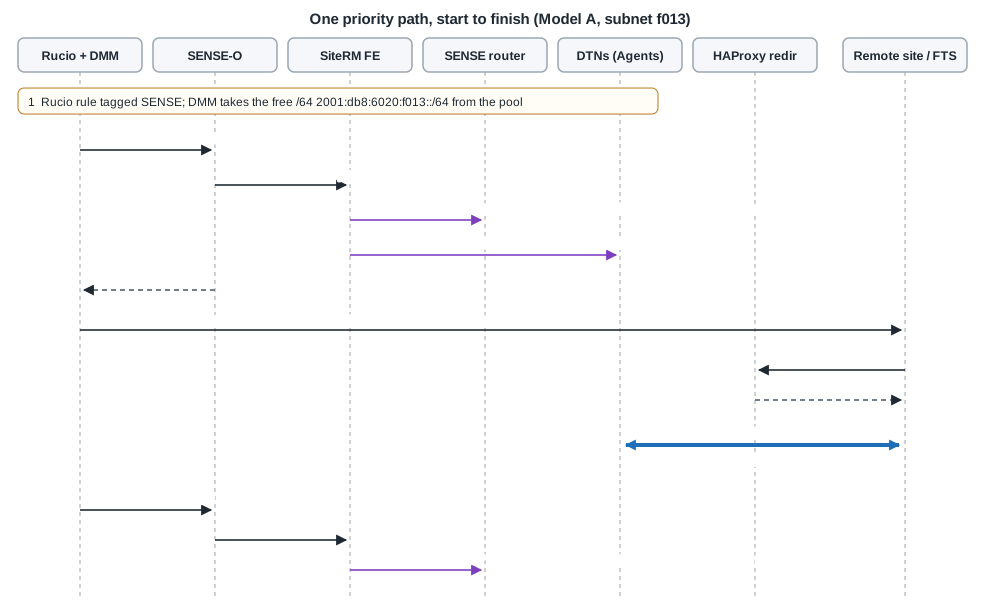
Example: Rucio asks for a priority path between T2_US_Example and a remote site. DMM takes the free subnet 2001:db8:6020:f013::/64 here and 2001:db8:9000:a2::/64 at the remote site, whose SENSE router uses AS 65020. SiteRM applies (request id 168313, VLAN 3606):
vlan 3606
interface Vlan3606
  mtu 9216
  description <request-id>
  ipv6 address fc00:0:104:9::1/64
  no shutdown
interface Ethernet1/36
  switchport trunk allowed vlan add 3606

ipv6 prefix-list sense-168313-from permit 2001:db8:9000:a2::/64
ipv6 prefix-list sense-168313-to permit 2001:db8:6020:f013::/64
route-map sense-168313-mapin permit 10
  match ipv6 address prefix-list sense-168313-from
route-map sense-168313-mapout permit 10
  match ipv6 address prefix-list sense-168313-to
router bgp 65010
  address-family ipv6 unicast
    soft-reconfiguration inbound
    network 2001:db8:6020:f013::/64
  neighbor fc00:0:104:9::2 remote-as 65020
    address-family ipv6 unicast
      route-map sense-168313-mapin in
      route-map sense-168313-mapout out
- The SENSE router learns
2001:db8:9000:a2::/64from the new neighbor. This route is more specific than the default route, so traffic to the remote /64 now goes over VLAN 3606. - The remote site learns only
f013::/64from us, so its return traffic tof013comes back over the same VLAN. - The Agents apply 25 Gb/s QoS per data server for
f013::/64. - FTS receives
davs://redir-f013.t2.example.org:1094endpoints. HAProxy redirects todtn-f013-NN, andtpc.fixed_routekeeps the data onf013addresses.
When the Rucio rule finishes, DMM cancels the path and SiteRM removes everything it added:
no ipv6 prefix-list sense-168313-from
no ipv6 prefix-list sense-168313-to
no route-map sense-168313-mapin permit 10
no route-map sense-168313-mapout permit 10
router bgp 65010
  address-family ipv6 unicast
    no network 2001:db8:6020:f013::/64
  no neighbor fc00:0:104:9::2 remote-as 65020
no vlan 3606
no interface Vlan3606
interface Ethernet1/36
  switchport trunk allowed vlan remove 3606
f013 traffic then uses the routed path again, through the border router’s /60 route, and f013 goes back into the pool.
Model B: individual /64s
Use Model B when a /60 is not available and the site can only provide separate /64s.
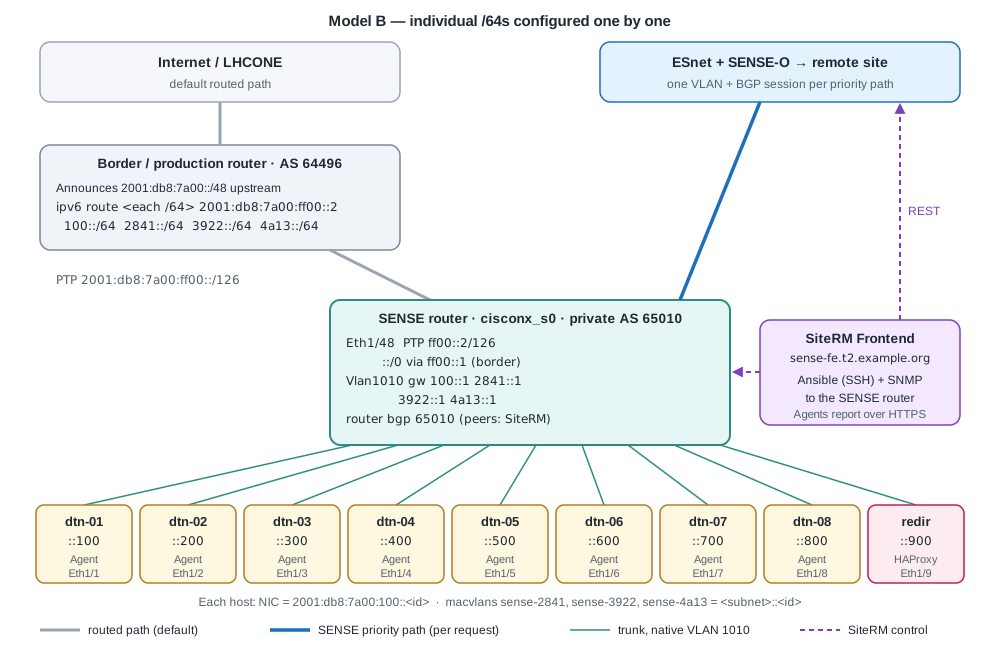
| Subnet | Role | Gateway | DNS names |
|---|---|---|---|
2001:db8:7a00:100::/64 |
Default | 100::1 |
dtn-01, redir
|
2001:db8:7a00:2841::/64 |
SENSE path 1 | 2841::1 |
dtn-2841-01, redir-2841
|
2001:db8:7a00:3922::/64 |
SENSE path 2 | 3922::1 |
dtn-3922-01, redir-3922
|
2001:db8:7a00:4a13::/64 |
SENSE path 3 | 4a13::1 |
dtn-4a13-01, redir-4a13
|
2001:db8:7a00:ff00::/126 |
Border link | border ::1, SENSE router ::2
|
The steps are the same as Model A. What changes:
- Allocation: each /64 must be unused everywhere else at the site. If a /64 was configured on an existing VLAN, remove it there first.
-
Border router: one route per /64, and each /64 must be covered by your upstream and LHCONE announcements:
ipv6 route 2001:db8:7a00:100::/64 2001:db8:7a00:ff00::2 ipv6 route 2001:db8:7a00:2841::/64 2001:db8:7a00:ff00::2 ipv6 route 2001:db8:7a00:3922::/64 2001:db8:7a00:ff00::2 ipv6 route 2001:db8:7a00:4a13::/64 2001:db8:7a00:ff00::2 -
SENSE router: one gateway address per /64:
interface Vlan1010 description gateway for the SENSE /64s mtu 9216 ipv6 address 2001:db8:7a00:100::1/64 ipv6 address 2001:db8:7a00:2841::1/64 secondary ipv6 address 2001:db8:7a00:3922::1/64 secondary ipv6 address 2001:db8:7a00:4a13::1/64 secondary ipv6 nd suppress-ra no shutdown -
Hosts: in the Step 3 script set
DEFAULT_NET=2001:db8:7a00:100andSENSE_NETS="2001:db8:7a00:2841 2001:db8:7a00:3922 2001:db8:7a00:4a13". The macvlans becomesense-2841,sense-3922andsense-4a13. -
DNS: in the generator set
DEFAULT_NET = "2001:db8:7a00:100::/64"andSENSE_NETS = ["2001:db8:7a00:2841::/64", "2001:db8:7a00:3922::/64", "2001:db8:7a00:4a13::/64"](36 names). -
Certificates:
TAGS="2841 3922 4a13"(4 names per host). -
HAProxy:
PREFIX=2001:db8:7a00andTAGS="2841 3922 4a13". -
SiteRM: list the three SENSE /64s in
ipv6-subnet-pool,metadata.xrootdand each Agent’sqos.interfaces.*.ipv6_range. - CRIC / LHCONE: register every /64.
Adding a fourth path later means repeating every item above for the new /64.
If the hosts must keep an existing production address and default route on another router, leave the DEFAULT_NET lines out of the script. The per-subnet tables still send SENSE traffic to the SENSE router, as long as the SENSE router is reachable at Layer 2 from the host for those /64s.
Checklist for the SENSE team
Send this when you are ready. It answers the standard site questions.
- SENSE router model and NOS version.
- Login method for SiteRM: password or SSH key. Credentials go only into
ansible-conf.yamlon the Frontend, never into Git or email. - Topology: which SENSE router port each data server uses, and any switches in between.
- Where the uplink terminates: provider, device and port (for example ESnet router and port).
- Hostnames and addresses of all data servers and the redirector.
- Data server interface name, speed, MTU and
txqueuelen. - VLAN range on the WAN port (usually 3600-3619), and confirmation that devices in between carry it.
- Private IPv4 and IPv6 ranges SENSE must avoid on peering interfaces (they override
ipv4-address-poolandipv6-address-pool). - Your public ASN. The SENSE team assigns the private ASN of the SENSE router.
- Your SENSE IPv6 space: the /60 (Model A) or the list of /64s (Model B), and which one is the default subnet.
- How storage is deployed: Docker, Kubernetes or bare metal; XRootD or dCache.
- SNMP access to the SENSE router (v2c or v3), or another source of interface counters.